🛠️┊Game Mechanics┊ 🛠️
⌜Weight System⌟
Weight System
General Information
- Each Outfit Piece has different weight, depending on the resistances they offer.
- The better the resistance, the more weight the Outfit Piece will have.
- Using a weapon will also add onto the weight. (visit Trello Cards for Weapons and Outfits, they have their weight listed on them)
- Weight Limit can be upgraded by upgrading the Strength Skill Tree.
- There are 3 Statuses for Weight:
- Green
- Yellow
- Red
- The Green Weight Status Effect doesn’t have debuffs, the Weight Limit for this is Half of the Weight.
(for eg. 0-20/40)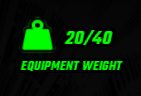
- The Yellow Weight Status Effect will give you (- Agility), meaning you will be running a little slower.
- (Check your Statistics in the Inventory to see your Health, Sprint Speed, Resistance numbers..)
- The limit on this is from Half to Max of the Weight
(for eg. 21-40/40)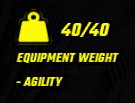
- The Red Weight Status Effect will give you (- - Agility), meaning you won’t be able to sprint.
- The limit on this is over Maximum Weight
(for eg. 41/40 and over)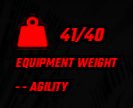
- The limit on this is over Maximum Weight
Warning - if you have the Red Weight Status Effect, you will get a warning on top of your screen saying that you won’t be able to sprint.
